Table of Contents
RapidPipeline Twin Studio v0.9.8 introduces Python Scripting, bringing new automation and customization capabilities to your 3D workflows. From managing complex scenes and materials to processing assets and generating renders, users can now automate repetitive tasks and interact with Twin Studio through a dedicated Python API.
Alongside this major addition, the latest update also brings a redesigned interface, improved rendering controls, and several workflow enhancements.
More Control, Less Manual Work with Python Scripting
Working with complex 3D assets often involves repetitive operations, from organizing scene hierarchies and assigning materials to preparing models for export or generating multiple renders.
With the new Python Scripting capabilities in RapidPipeline Twin Studio, these operations can be automated, helping users save time, reduce manual work, and build more flexible workflows.
The new scripting console allows users to run Python scripts directly within the application or load existing scripts through the interface. Built-in auto-completion also makes it easier to explore the available API and develop scripts efficiently.
Whether you're managing large CAD assemblies, preparing assets for visualization, or handling repetitive production tasks, Python Scripting provides greater control over how you work with your 3D data.
What Can You Automate with Python Scripting?
The new Python API exposes key Twin Studio functionalities, opening up several possibilities for workflow automation.
1. Scene Management and Organization
- Navigate complex scene hierarchies and automate common scene management tasks.
- Explore and filter scene nodes by name or metadata.
- Select, hide, show, or delete specific objects.
- Clean up empty or hidden nodes.
- Organize complex assets more efficiently.
2. Material Management
- Simplify material assignment and maintain consistency across your 3D assets.
- List and access scene and library materials.
- Assign materials to selected objects.
- Import and export material assignments using CSV files.
- Export scene materials as reusable material libraries.
3. Asset Processing and Reimporting
- Automate processing operations and customize how assets are imported.
- Run processing actions on entire assets or selected objects.
- Reimport CAD assets with custom import settings.
- Apply targeted operations without manually repeating each step.
4. Automated Rendering
- Generate visual outputs programmatically, with greater flexibility over rendering operations.
- Render complete scenes or individual objects.
- Generate separate renders for each mesh.
- Create 360° turntable sequences.
- Choose renderers and quality presets.
These capabilities make it easier to build repeatable workflows, particularly when working with multiple assets or complex 3D projects.
Built for Flexible and Customizable 3D Workflows
Python Scripting extends Twin Studio beyond its graphical interface, allowing users to tailor operations to their specific production needs.
It also opens up possibilities for users working with AI-powered coding assistants, which can help develop and adapt scripts for customized workflows.
From automating material assignments to generating consistent rendering outputs, the Python API provides an additional layer of flexibility for teams looking to streamline their 3D production processes.
More Improvements in Twin Studio v0.9.8
Beyond Python Scripting, this release introduces several improvements designed to make everyday workflows more intuitive and efficient.
A refreshed user interface
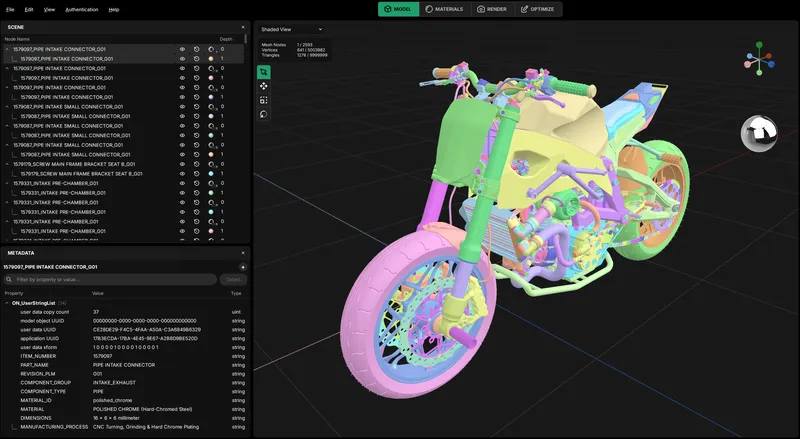
Twin Studio now features a redesigned interface, including an updated menu layout and a custom Windows title bar.
More flexible rendering controls
The updated Render Mode introduces three quality presets, Preview, Default, and Final, alongside a new rendering window with live previews and the ability to pause, resume, or stop renders. 360° rendering also benefits from customizable output resolutions, per-frame progress tracking, and estimated completion times.
Improved viewport and material workflows
New keyboard shortcuts simplify navigation and object manipulation, while material library improvements make selecting, assigning, and managing materials more intuitive. Additional import/export fixes and renderer stability improvements further enhance the overall experience.
For the complete list of changes, explore the Twin Studio v0.9.8 Release Notes.
Get Started with Python Scripting
Ready to explore the new scripting capabilities?
Our dedicated documentation provides practical tutorials covering scene management, material assignments, asset processing, and automated rendering.
Explore the Python Scripting Tutorials
Python Scripting requires a separate license and is available through Desktop Industrial or custom Enterprise licensing. It is not included in Desktop Pro, Ultimate, or Individual licenses.
Interested in testing Python Scripting or integrating automation into your 3D workflows?
Contact our team to request access or a trial license and discover how RapidPipeline Twin Studio can support your production needs.
Meet the Author

DGG Team
The 3D Pipeline Company
DGG is on a mission to connect the real and virtual by making 3D models as easy to handle as 2D images.