
The Complete SolidWorks to PRC/U3D Conversion Guide
General Information
This guide is part of the RapidPipeline 3D Formats Knowledge Database.It shows how to convert SolidWorks to PRC/U3D, if you'd like to know more about the formats, please check out the following links:
Converting and Optimizing SolidWorks Files to PRC/U3D
RapidPipeline can import SolidWorks files, but currently doesn't support exporting to PRC/U3D format yet.
If you specifically need PRC/U3D export functionality for your workflow, please feel free to get in touch with us - we'd be happy to discuss your requirements and potential timeline for adding this export capability.
If you need, you can import PRC/U3D files and convert them to any of these 8 formats: FBX, glTF, OBJ, PLY, STL, USD, USDZ, and VRM.
In the meantime, you can explore other options on the 3D Formats Knowledge Database, which might serve as suitable alternatives for your workflow depending on your target applications and use cases.
What are SolidWorks and PRC/U3D files commonly used for?
The SolidWorks file is a format mostly used for Professional 3D CAD software for mechanical design and product development.
The PRC/U3D file is a format mostly used for 3D data embedding in documents and technical publishing.
Create 3D digital twins for CGI & XR, faster than ever.
Turn your raw 3D or CAD into realistic digital twins.

Comparison of Features Supported by SolidWorks and PRC/U3D
| Feature | Supported by SolidWorks | Supported by PRC/U3D |
|---|---|---|
| PBR Materials | Yes | No |
| Transparent Materials | Yes | Yes |
| Vertex Colors | Partial0 | Yes |
| Materials | Yes | Yes |
| Embedded Textures | Partial1 | Yes |
| Normal Mapping | Partial2 | Partial3 |
| Procedural Textures | Partial4 | No |
| Texture Compression | No | Partial5 |
| Texture Transforms | Yes | Yes |
| Multiple UV Channels | Partial6 | Yes |
| Texturing | Yes | Yes |
| Hierarchical Scene Graph | Yes | Yes |
| Scene Composition | Yes | Yes |
| Scene Nodes | Yes | Yes |
| Quad Meshes | Yes | Yes |
| Free-Form Surfaces | Yes | Yes |
| Geometry Compression | No | Yes |
| Basic 3D Geometry | Yes | Yes |
| Standardized Format | Partial7 | Yes |
| Morph Targets | No | Partial8 |
| Skinned Animations | No | Partial9 |
| Rigid Animations | Yes | Yes |
| Animations | Yes | Yes |
Create 3D digital twins for CGI & XR, faster than ever.
Turn your raw 3D or CAD into realistic digital twins.
Limitations of SolidWorks Files to PRC/U3D Conversion Workflow
The following limitations should be taken into account when converting SolidWorks files to PRC/U3D format:
| SolidWorks Feature (not supported by PRC/U3D) | Limitation Details |
|---|---|
| Procedural Textures | Procedural Textures Support: SolidWorks: Partial support | PRC/U3D: No support 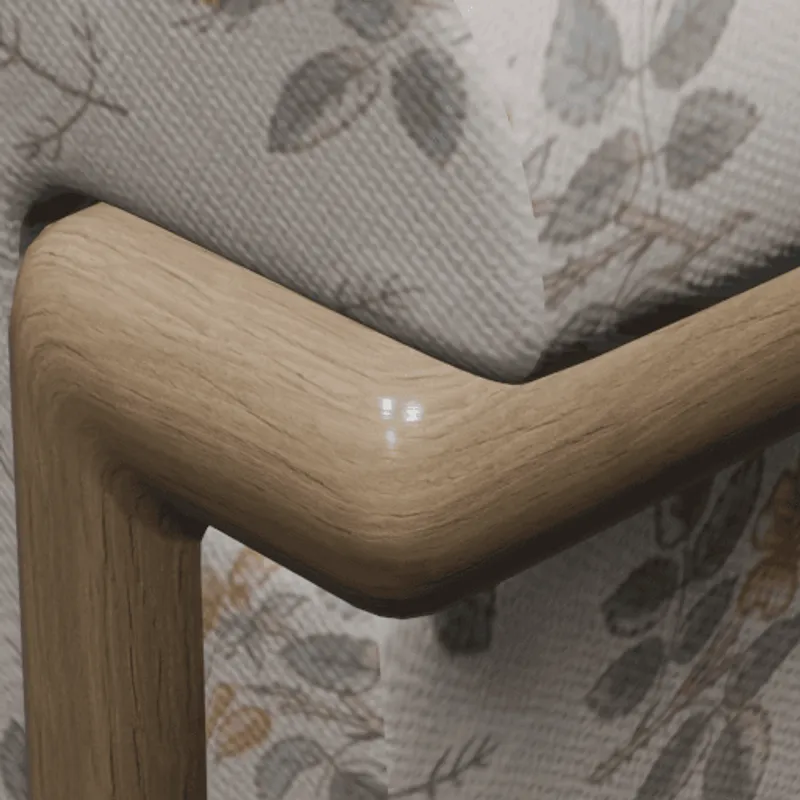 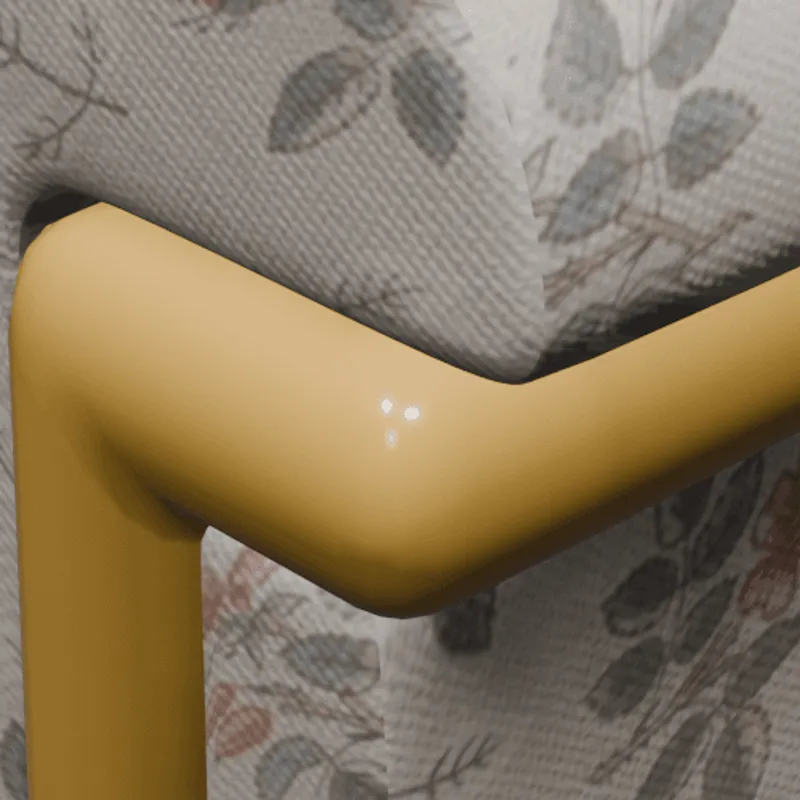 SolidWorks Notes: Limited procedural texture capabilities, mainly through basic material properties and appearance settings. Impact: Procedural texture allow the modeling of surface details through mathematical functions, along with artistic control over various parameters. Typically, they are used for patterns like wood grain or other semi-regular structures. Since they are not using any pixels as source data, procedural textures have, in principle, infinite resolution and are very lightweight to describe. In this example, a procedural texture is used to model the look of a wooden material. Without support for this feature, in this case, the wooden parts won't show any visible details. |
| PBR Materials | PBR Materials Support: SolidWorks: Full support | PRC/U3D: No support   Impact: PBR materials enable Physically-Based-Rendering (PBR) for a standardized, photorealistic look of rendered images. PBR uses concepts like metallic-roughness or specular-glossiness properties and a microfacet-based modeling of the surface, using a concept called BRDF (Bi-Directional Reflectance Distribution Function). In this example, PBR materials are used to achieve realistic looking plastic and metal materials. Without support for PBR materials, only basic colors and shading can be used (for example, based on more simple shading models, such as the Blinn/Phong model). |
What's the best way to get SolidWorks files into my 3D applications, and are there alternatives to using PRC/U3D?
Doing 3D conversion right, especially at scale, can be tricky, as 3D data is in general a rather complex (yet very powerful!) medium. This also applies to SolidWorks and PRC/U3D files - the conversion guide above provides a rough first idea about that. Once you know what you would like to do, tools like RapidPipeline can help you perform the necessary steps, and to even automate the process for thousands or even millions of files.
Especially when introducing pipelines and workflows at scale in an enterprise context, it is usually good to rely on dedicated tools and expertise, making sure you do not introduce any steps into your 3D workflow that are detrimental to the final output's quality, or that take your team too much time (and money).
If you're interested to hire dedicated expertise from the best in the field to help your company reach your goals fast and reliably, please do not hestitate to contact DGG. Being the creators of RapidPipeline, and ambassadors for open 3D standards for more than a decade, we have been building some of the world's most advanced 3D pipelines, having processed many millions of 3D assets.
Therefore, our expertise will help you to reach your goals faster, at scale, and with the least possible friction, since we are focused on maximum interoperability.
To get started with 3D data conversion and optimization today, sign up for a free account!
If you have any questions, feel free to chat with our human team.
Create 3D digital twins for CGI & XR, faster than ever.
Turn your raw 3D or CAD into realistic digital twins.
Meet the Author

3D Knowledge Team
3D Technical Artists
RapidPipeline lets you convert, optimize and prepare your 3D models, easily. Try it today, or meet our human 3D experts. The Best-in-Class Tools for Your 3D Processing Jobs