
3D Model of the Month - Regularized Grid Tessellation: From CAD to Artist-Ready 3D
Table of Contents
Introduction
Turning CAD geometry into a 3D asset is not simply a matter of making a mesh out of a surface. Once that geometry enters a creative workflow, artists need to work with it. Traditional tessellation methods are very good at approximating a CAD surface, but the resulting topology can be unintuitive for artists. That's where Regularized Grid Tessellation comes in.
Our new Regularized Grid tessellation method creates a structured, quad-based topology that is easier to understand and work with. It bridges the gap between the precision of CAD geometry and the workflows artists are used to.
Create 3D digital twins for CGI & XR, faster than ever.
Turn your raw 3D or CAD into realistic digital twins.
What is Regularized Grid Tessellation?

Tessellation is the process of converting CAD geometry into a polygon mesh. Regularized Grid is a new available tessellation method. Rather than simply generating polygons where they are needed to approximate the surface, this mode creates a more structured topology that follows a grid-like pattern. The result is a mesh made from quads arranged in a predictable structure.
In the until now available method, Adaptive Mesh, the resulting mesh can contain polygons of different sizes and orientations. This is often an efficient way to represent the original CAD surface, but the topology can be difficult for an artist to read or manipulate.
The Regularized Grid method is different: It creates a visual language that is already familiar to artists: rows, columns, loops and quads.
In other words, the goal is not only to preserve the shape of the original CAD model. It is to produce geometry that makes sense in the context of a 3D content creation workflow.
When Regularized Grid Is a Game Changer
Not every model needs a regular grid. If the resulting mesh is only going to be used for a very simple visualization and never touched again, a conventional tessellation may be perfectly sufficient.
But as soon as the mesh becomes part of an artist's workflow, topology starts to matter. Here are some situations where Regularized Grid can make a real difference:
1. More stable behavior under deformation
Quads and structured edge flow provide a much more predictable foundation for deformation. This is particularly useful if your model becomes part of an animation or interactive experience.
Whether you are creating a product animation, opening a mechanical component, or bending a part, a regular topology gives deformation a more consistent surface to work with.
2. Better visual consistency when shading
Regular topology can also contribute to more consistent visual results.
Irregular geometry can sometimes introduce unwanted variations in shading, particularly on stretched, smooth or reflective surfaces. A structured distribution of polygons can help avoid topology-related artifacts becoming visible in a final render.
3. Easier manual editing
One of the simplest benefits is also one of the most important: artists cannot only understand, but also adjust the mesh.
When an artist sees a regular grid, they immediately have an idea of how the topology works. Edge loops and rows of polygons are easy to identify, select and modify. That makes common operations such as smoothing, editing, selecting regions or making local adjustments much more intuitive.
4. Topology becomes artist-readable
And perhaps this is the biggest difference of all: Artists are used to reading topology visually. They understand loops, rows, quads and edge flow because these concepts are part of everyday 3D modeling. Regularized Grid speaks the same language.
The Optimal Parameters for Your Model
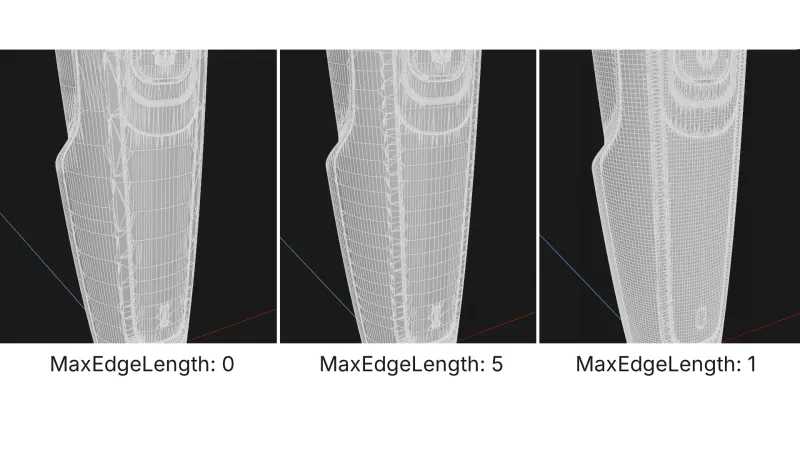
Regularized Grid gives you the structure of a quad-based mesh, but the combination with the parameter MaxEdgeLength is what makes it really revolutionary.
These two tessellation parameters give you control over how fine the resulting grid should be:
Tessellation Resolution

With the tessellation resolution you can control how dense the generated mesh will be. You can choose between these presets (from higher to lower density):
Extra Fine - Fine - Medium – Coarse – Extra Coarse
*Please note that setting this to “Custom” gives you full control to create “your own” tessellation setting, but it´s an advanced option we only recommend for experiencesd users, as it can result in unexpected results if used randomly.
Max Edge Length
While Regularized Grid gives you quads, it does not automatically mean that the resulting mesh contains the subdivision loops you might expect from a manually modeled asset. MaxEdgeLength gives you control over how frequently the geometry is split. This means using it alone might produce results with long quads.
By setting the maximum edge length, you control how large the individual polygons can become, making it more similar to what artists are used to.
Create 3D digital twins for CGI & XR, faster than ever.
Turn your raw 3D or CAD into realistic digital twins.
From CAD to Render: The Complete Workflow
For a static product render, the difference between two tessellation methods might initially seem purely technical: The CAD surface is tessellated. The model looks correct. The job is done.
However, the resulting topology affects potential animations, manual edits, or even simply how confident the artist working with this model might feel.
That's why Regularized Grid can be valuable even when the immediate goal is simply a high-quality static render. It provides a bridge between two worlds: on one side is the structured precision of CAD; on the other is the flexible, visual language of 3D content creation.
Because in a modern 3D pipeline, tessellation isn't just about getting from CAD to polygons. It's about getting from CAD geometry to geometry that people can work with.
As Michael Tanzillo writes, “the gap between what automation fixes and what a person has to fix is a real job.” Regularized Grid is valuable precisely because it helps making that gap smaller. Not by replacing the artist, but by giving them geometry they can trust.
Meet the Author

Teresa
Technical 3D Artist
Teresa is a 3D Technical Artist at DGG, bringing with her a robust background in Animation and Game design. Driven by a passion for the intersection of art and technology, she relocated to Germany to pursue her artistic ambitions. Within DGG, Teresa plays a pivotal role in infusing the team with her artist's perspective, focusing on the creation of high-quality visual content and ensuring the quality assurance of tools. Her overarching goal is to continually evolve within the industry, delivering compelling visual solutions that resonate with DGG's mission of streamlining and scaling 3D content preparation.
You might be interested in