Table of Contents
Combeenation is a CPQ (Configure, Price, Quote) and product configuration platform for manufacturers of complex, customizable and modular products.
Real-time 3D visualization plays an important role in that experience. Using Babylon.js, Combeenation enables highly complex and configurable products to be visualized directly in the browser.
Behind those experiences is a small 3D team responsible for the complete asset pipeline, from converting customer CAD data and preparing geometry for real-time use to building PBR materials, parametrizing models and optimizing assets for web-based visualization.
As the complexity of customer product data increased, keeping that pipeline efficient and repeatable became increasingly important.
The Challenge: Too Many Steps Between CAD and Blender
Combeenation’s previous CAD workflow relied primarily on PiXYZ Studio. While the tessellation quality worked well for many assets, projects containing large numbers of STEP files created additional complexity.
Assemblies often include identical or reused components, which Combeenation later turns into instances in Blender and Babylon.js to support real-time performance. Processing large file sets together was therefore important, but larger batches could require significant manual intervention. Processing files individually, on the other hand, introduced more steps and made repeated geometry harder to identify.
Before:
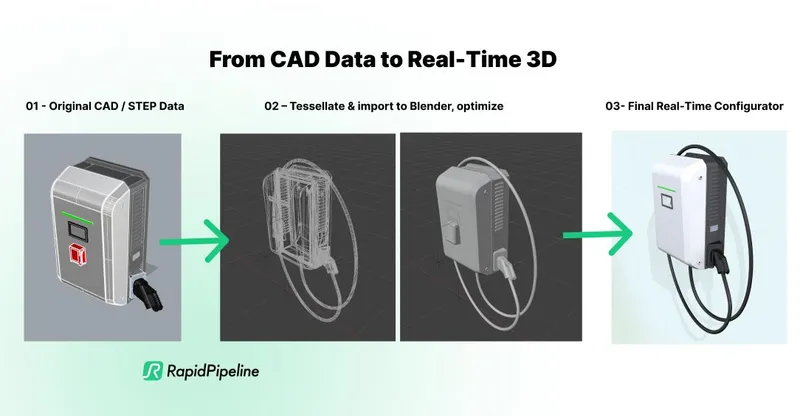
CAD / STEP → PiXYZ → FBX → Blender → glTF
This meant intermediate files, repeated import and export operations, and additional opportunities for data to require correction between applications.
Licensing added another constraint. Both members of the 3D team needed access to CAD processing, while advanced PiXYZ functionality such as scripted import and export was available at licensing tiers that did not fit the scale of the team. Importantly, this scripted I/O capability relates to the previous PiXYZ setup, Combeenation does not currently use scripted import/export through the RapidPipeline Blender add-on.
The Solution: Making Blender the Starting Point
Combeenation initially evaluated RapidPipeline for automated optimization of existing real-time assets, including lower-detail geometry generation, texture optimization and KTX2 compression.
During that evaluation, the team also found that RapidPipeline’s CAD tessellation could meet its requirements. Combined with the direct Blender integration, this opened up an opportunity to simplify the CAD pipeline itself rather than simply adding another optimization stage at the end.
Today, Combeenation consolidates the source CAD data and uses RapidPipeline to tessellate and bring the complete project into Blender in a single workflow.
With RapidPipeline
CAD / STEP → Blender → glTF
Instead of being the destination of a longer preprocessing chain, Blender becomes the starting point for the actual 3D production workflow.
From there, the team can immediately continue with the work required for Combeenation: identifying and instancing repeated components, cleaning and parametrizing geometry, creating PBR materials, preparing configurable elements and optimizing assets for real-time rendering.
Results: A Leaner, More Flexible CAD-to-Blender Workflow
Integrating RapidPipeline directly into the Blender-based production pipeline has reduced both workflow complexity and operational friction.
- Fewer conversion steps: the workflow moved from CAD / STEP → PiXYZ → FBX → Blender → glTF to a much shorter CAD / STEP → Blender → glTF path.
- Less manual handling: fewer intermediate files, imports and exports reduce repetitive work and the number of points where additional corrections may be required.
- More reliable handling of large CAD datasets: complete datasets can be brought into Blender as a single operation, providing a more consistent starting point for production.
- Better access for the full 3D team: two RapidPipeline licenses are roughly comparable in cost to the single PiXYZ license previously used, allowing both artists to work independently with CAD data.
- A closer technical feedback loop: Combeenation can discuss real production requirements directly with the RapidPipeline team and share CAD examples and workflow feedback that can inform ongoing product development.
The overall result is a shorter data path, less manual overhead and a workflow in which CAD processing becomes an integrated part of Blender production rather than a separate preprocessing stage.
More Than a Tessellation Tool
For Combeenation, the value of RapidPipeline goes beyond CAD conversion quality alone.
The direct Blender integration keeps production inside the team’s primary DCC environment, while the licensing model gives both artists access to the tools they need. At the same time, the close technical exchange with RapidPipeline provides a way to address production-specific requirements as the workflow evolves.
That combination of CAD processing, native workflow integration, licensing flexibility and technical collaboration is what ultimately makes RapidPipeline a better fit for Combeenation’s production setup.
“RapidPipeline has turned CAD conversion from a separate preprocessing step into a natural part of our Blender workflow. For a small 3D team working with complex product data, the combination of strong tessellation, direct integration and close technical collaboration makes a real difference.”
David Fenkhuber, 3D Technical Artist, Combeenation
About Combeenation
Combeenation is a CPQ and product configuration platform for manufacturers of complex, customizable and modular products. The platform combines product configuration, advanced pricing and quoting with real-time 3D visualization and integrations across ERP, CRM, PIM, e-commerce and other business systems.
Meet the Author

DGG Team
The 3D Pipeline Company
DGG is on a mission to connect the real and virtual by making 3D models as easy to handle as 2D images.